7 Best SafetyCulture (Mitti) Alternatives in 2026
A completed inspection is only part of the job. Someone still has to fix the failed checks, review the evidence and tell the next shift what changed.
SafetyCulture is now Mitti. The company announced the new name on 11 August 2026; the rebrand itself did not require customers to replace their accounts or workflows.
The seven options below cover recurring site work, scored audits, maintenance, workforce management and technical field forms. Start with the job you need to improve, then compare the plan that actually supports it.
How we compared these alternatives
TARGPatrol publishes this guide and is one of the products compared. We reviewed official product information and published prices on 7 November 2026. We compared documented capabilities; we have not independently tested every app.
We looked at mobile inspections, evidence capture, corrective action tracking, offline work, reporting, integrations and the cost of the plan needed to do the job. The order reflects use cases, not a universal score. Our software review methodology explains the wider approach.
Quick comparison: seven SafetyCulture alternatives
Prices reflect the amounts advertised by each vendor, before applicable taxes. Confirm the currency when requesting a quote. Annual figures are monthly equivalents paid on an annual contract. Entry prices do not include every feature discussed later.
TARGPatrol: Recurring site checks, patrols and follow-up Incidents. Free for up to 10 users; Base $12/user/month annually or $15 monthly. Check: Free media expires after 7 days; exports and notifications require a paid plan.
GoAudits: Inspection reports and scored audits. Starter $10/user/month annually; 14-day trial. Check: Scheduled audits and advanced reporting need Enterprise.
Lumiform: Inspection logic and corrective-action workflows. Professional and Enterprise: request a quote. Check: Approvals, integrations and enterprise services affect the package.
MaintainX: Equipment checks linked to maintenance work orders. Basic free; Essential $20/user/month annually or $25 monthly. Check: Recurring procedures can outgrow entry-plan limits.
Connecteam: Forms alongside shifts, time tracking and team communication. Operations Basic $29/month annually or $35 monthly for the first 30 users. Check: Other hubs and advanced form features can add cost.
GoCanvas: Mobile forms, dispatch and configurable PDF reports. Essentials $29/user/month annually; three-user minimum. Check: Multi-user workflows and API access start on Pro.
TrueContext: Technical field workflows with controlled forms. Digital from $400/month for the team, billed annually. Check: Connected workflows and advanced controls have separate tiers.
First, compare against the current Mitti platform
Do not evaluate today's alternatives against an old description of iAuditor. Mitti covers inspections, tasks, issue reporting, training and broader operations. Its Free plan supports up to 10 users and five active inspection templates. Premium is advertised at $24 per seat per month annually or $29 monthly. Location-based pricing is also available.
Mitti already supports actions raised during inspections, recurring standalone actions and question logic that requires an action before submission, as described in its Actions guide. Compare the assignment, review and closure process in any replacement; collecting the same checklist answers is only part of the migration.
Write down what you actually use: inspection templates, reports, training records, integrations, permissions and historical evidence. Replacing one subscription with three tools can cost more, even if the inspection app is cheaper.
If Mitti already handles those needs well, the name change is not a reason to leave. A switch is worth investigating when a specific job remains awkward, the pricing model no longer suits your team, or you need capabilities in a different category.
What the prices mean for a 20-person team
As an illustrative subscription comparison, 20 TARGPatrol Base users cost $240 per month on annual billing; 20 Mitti Premium full seats cost $480 on the same basis. Connecteam Operations Basic is advertised at $29 per month annually for the first 30 users. These are monthly equivalents, not month-to-month commitments, and they do not buy identical functionality.
The comparison changes when the required workflow changes. Connecteam's conditional fields need Advanced, GoAudits scheduling needs Enterprise, and GoCanvas has a three-user minimum even for a one-person pilot. A free plan for a very small team can be sensible for evaluation, but media retention or export restrictions can make it unsuitable for the records you need. Get a quote for the same users, inspections, approvals and retention period before calling one option cheaper.
The example assumes full Mitti seats. Its lite and guest seats have different access and inspection limits. Match occasional contributors to the appropriate seat type before comparing costs.
When is it worth switching from Mitti?
If supervisors still copy failed checks into a spreadsheet, test corrective action tracking. If new starters need repeated help, compare ease of use for frontline workers. If the bill is the problem, compare the same number of inspectors and managers, not the cheapest advertised plan. For seasonal teams, calculate per-seat pricing across both busy and quiet months. Confirm when deactivated users stop being billed and whether an annual commitment can be reduced mid-term.
Platform complexity is another reason to reassess. A small cleaning company may need recurring inspections and incident management but have little use for a wider training or construction project management suite. A contractor might have the opposite problem: simple forms are no longer enough for permits and worker qualifications.
Consider a move if the current setup cannot provide reliable offline performance at your sites, customer support during your working hours, a required integration or an acceptable data-storage arrangement. Regional data preferences and access requirements can rule out an otherwise suitable product. First ask whether a plan or configuration change solves the problem; compare that cost with migration before replacing the platform.
Better usability means fewer errors and less help needed for the core safety workflow, not just a cleaner-looking dashboard. Test that with the people who perform the work. Better value means paying for the inspections, action management and support you need without maintaining features nobody uses. A worthwhile switch should improve one of those outcomes enough to justify rebuilding templates, moving records and retraining staff.
Test support before you commit
Use the trial to send a genuine workflow question to customer support, such as recovering an inspection that has not synchronized. Check the reply against the working hours and language of your field team. Does it explain the next step, or send you back to a general help page? Ask how a blocked inspection is escalated and distinguish a promised response time from a promised resolution. If support is the reason for leaving Mitti, test that same problem with the replacement.
1. TARGPatrol: for inspections tied to work at a site
TARGPatrol is a good starting point when inspections sit alongside cleaning rounds, security patrols, opening checks or maintenance routines. A manager schedules the work, attaches a checklist and assigns it. Employees complete the steps on mobile, record evidence and report problems from the same task.
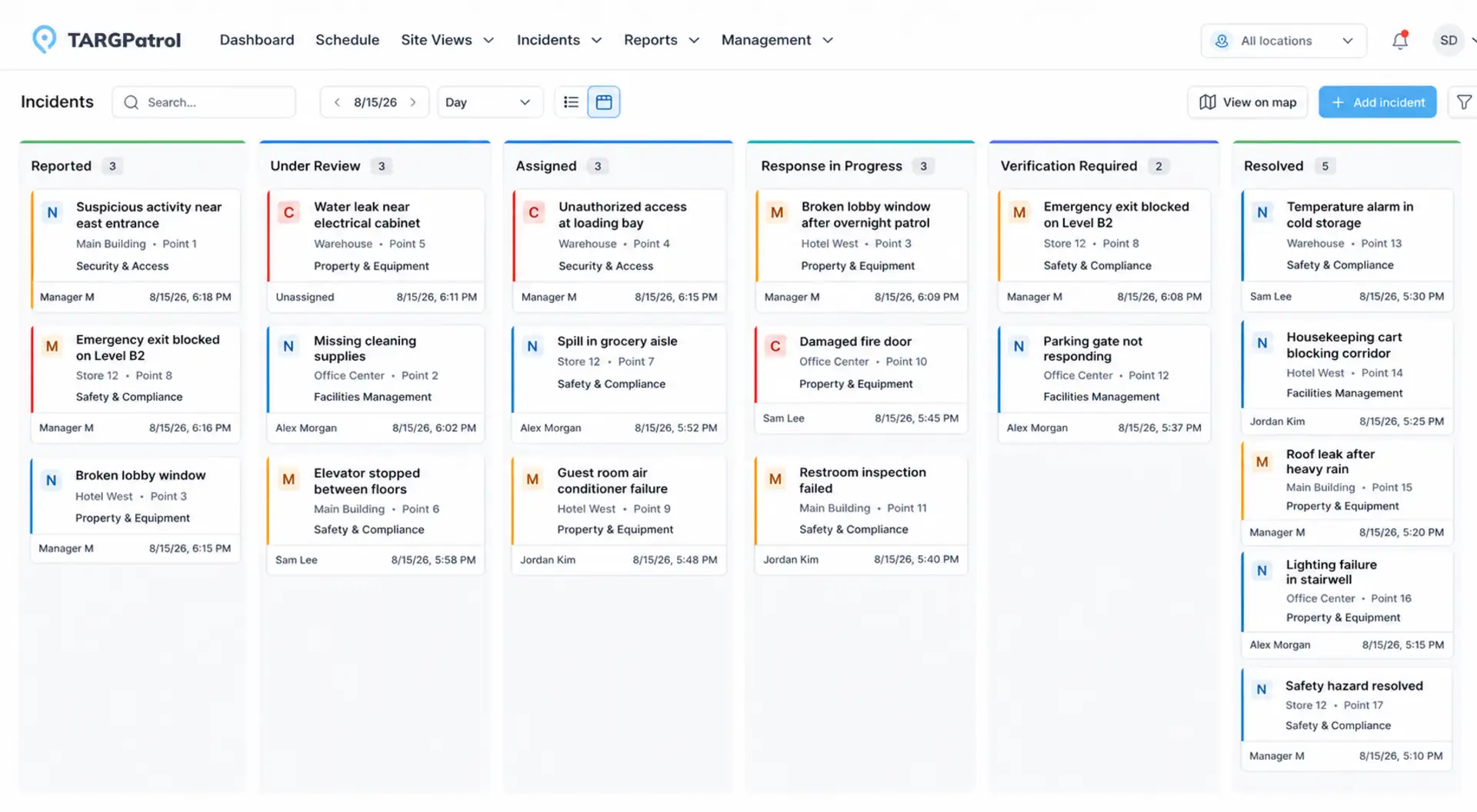
TARGPatrol’s Incident Kanban view shows reports, owners and workflow stages. Source: TARGPatrol.
Consider a cleaning contractor covering several buildings. The supervisor needs to know whether each washroom was checked, which checks failed and who is dealing with the problem. A completed PDF alone may not answer all three questions.
Reusable checklists collect structured answers, measurements, comments and photos.
QR and NFC checkpoints, plus GPS Point proximity checks, connect a check-in to a place. GPS validation checks the reported device location; it is not a guarantee against inaccurate coordinates.
Employees can create Incidents separately or while completing a task. Managers can track responsibility and progress through the configured workflow.
Reports bring task results, exceptions and evidence together across locations. Mobile execution supports offline work.
Evaluate TARGPatrol as a Mitti alternative if your priority is scheduled work, physical checkpoints and Incident follow-up in one workflow. It is not a payroll suite, a parts-inventory system or a complete enterprise EHS platform. If you depend on Mitti training or other modules, check their replacements separately.
Pricing: Free supports up to 10 users, but photos and attachments are automatically deleted after seven days. Base is $15 per user per month, or $12 with annual billing. Notifications, PDF/Excel exports, audit logs, video/audio attachments, External API access and webhooks require a paid plan. Check the current plan table before using Free for records you need to retain.
2. GoAudits: for inspection reporting and scored audits
GoAudits is closer to a traditional audit workflow: build a checklist, inspect on a phone or tablet, record findings and produce a report. It supports offline inspections, photo annotations, scoring and action plans. That makes it a practical candidate for a regional manager comparing standards across shops or hotels.
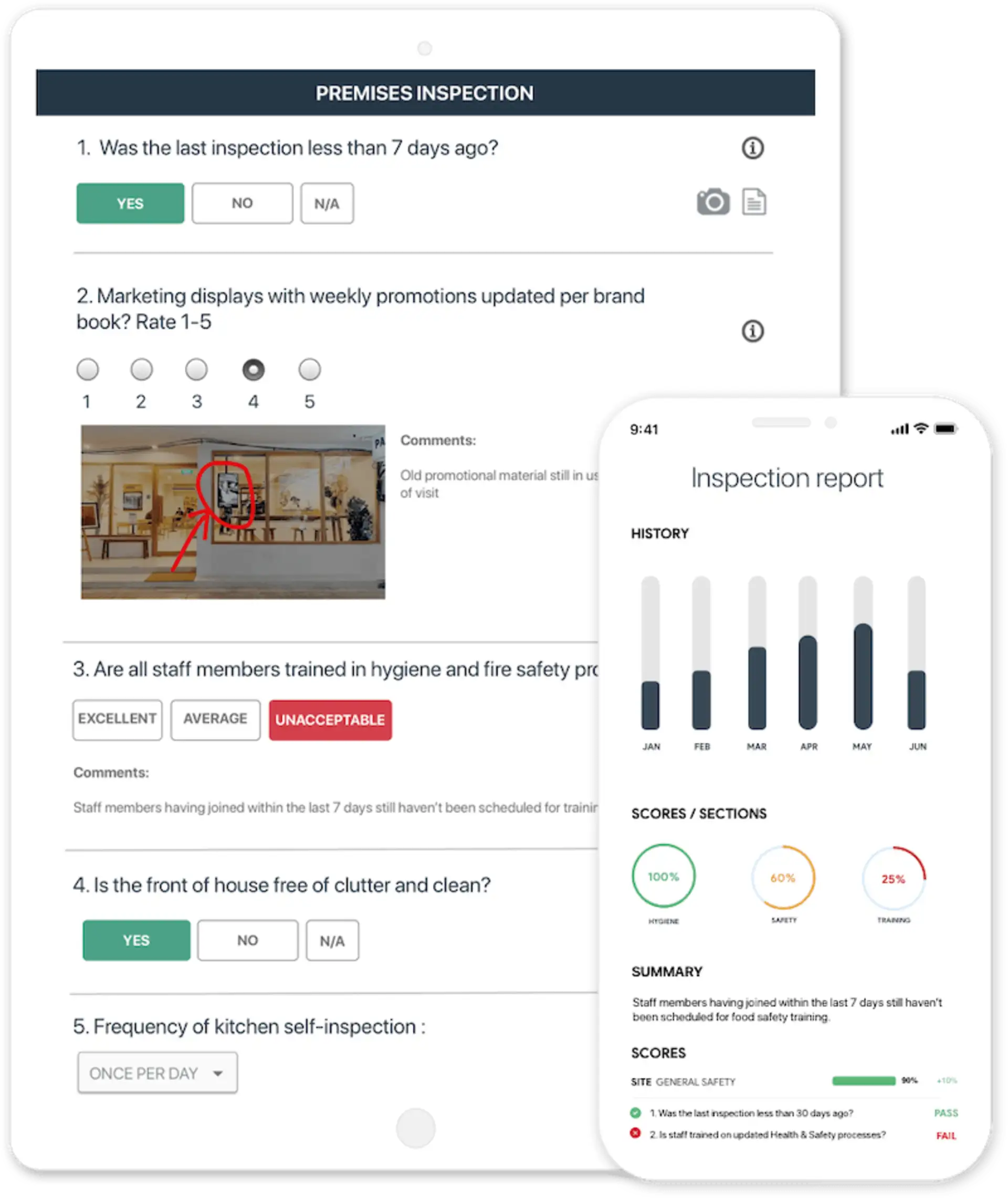
GoAudits pairs inspection responses and annotated photos with a scored report. Source: GoAudits.
For a team using Mitti mainly for scored audits, GoAudits offers a focused alternative to evaluate. It is not automatically a cheaper replacement for every Mitti workflow: the plan boundary matters. Starter includes 10 checklist templates and 25 locations, but scheduling and assigning audits, advanced trends and broader reporting sit in Enterprise. A small team can still need the higher tier if scheduled inspections are essential.
Pricing: Starter is $10 per user per month with annual billing; Enterprise is $30 on the same basis. There is a 14-day trial. Test the finished report with the person who receives it, not just the inspector filling it in.
3. Lumiform: for inspection logic and follow-up actions
Lumiform is worth a look when your forms need to react to the answers. Its inspection tools include scoring, decision logic, photos, signatures and offline capture. Failed checks can lead to corrective actions with an owner, deadline and status. The platform also offers site comparisons and configurable reporting.
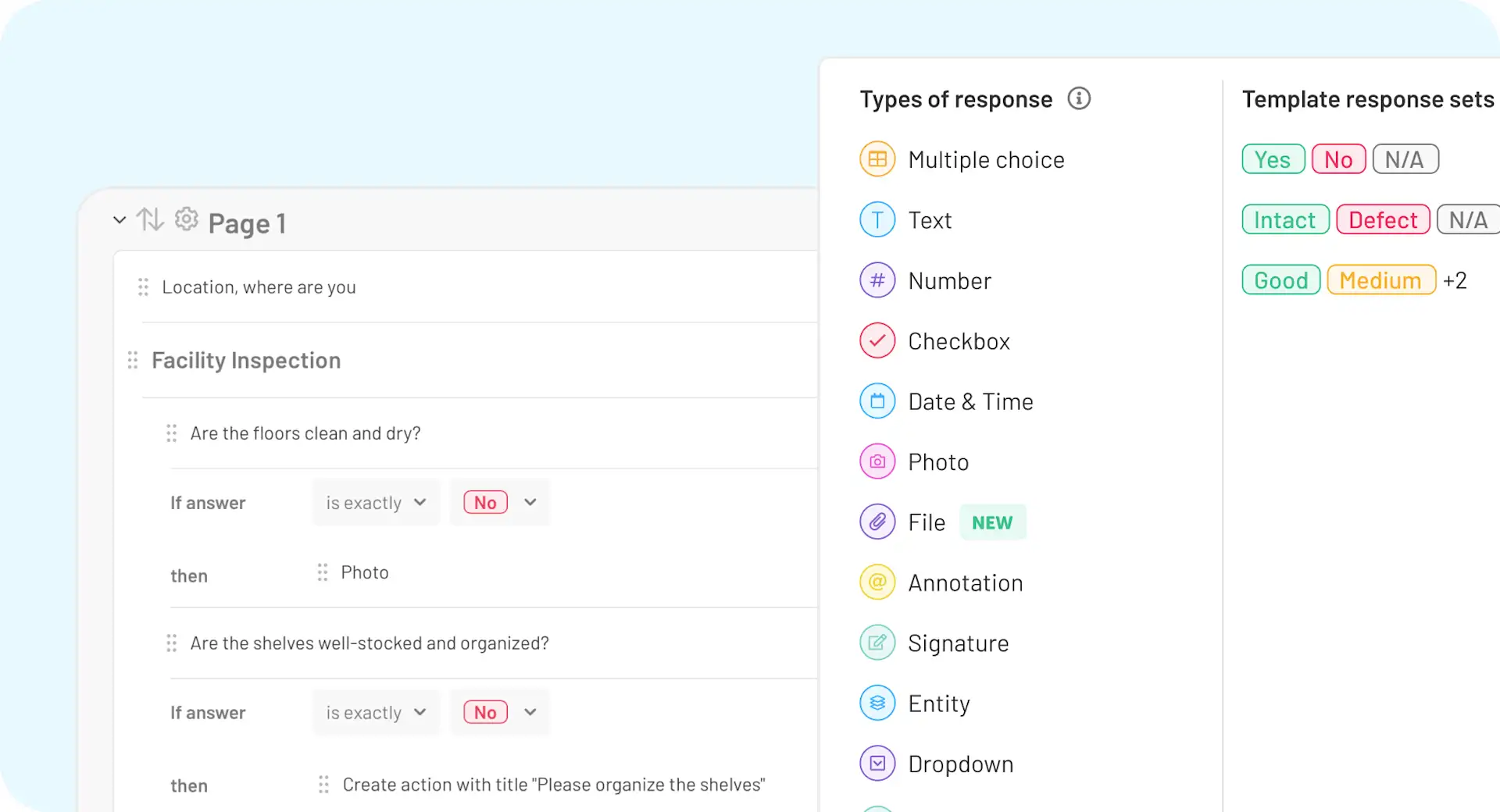
Lumiform’s form builder shows conditional inspection questions and configurable response fields. Source: Lumiform.
The case for switching from Mitti depends on whether Lumiform can handle your exception and approval rules more cleanly, not simply whether both products offer digital forms. For a food business, that could mean a failed temperature check leads to a documented response instead of disappearing inside a completed checklist. Bring your actual exception rules to the demo: what should trigger an action, who must approve it and when it can be closed?
Pricing: Both Professional and Enterprise are quote-based. Professional includes unlimited templates, branded reports and analytics. Approvals, API access, webhooks and other enterprise capabilities are included in Enterprise or offered as add-ons. Ask for a quote covering your full workflow, including onboarding and the permissions you need.
4. MaintainX: for inspections that become maintenance work orders
MaintainX makes sense when a failed inspection usually means someone must repair an asset. Equipment checks, procedures and recurring work orders sit alongside maintenance records. Higher plans add parts inventory, purchasing, meter-based maintenance and cost tracking.
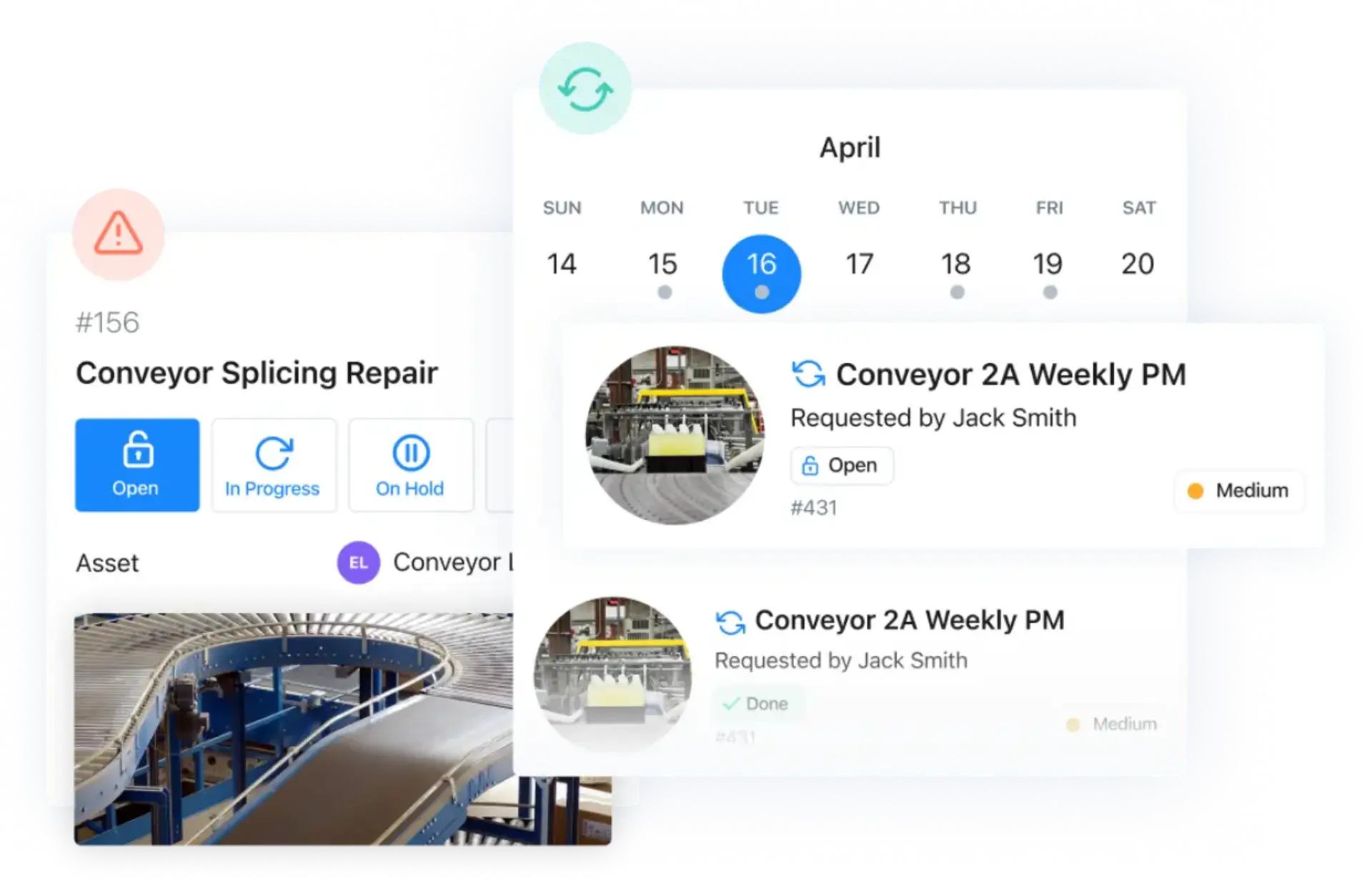
MaintainX’s product view combines a repair work order with scheduled preventive maintenance. Source: MaintainX.
For a Mitti user, the reason to switch is to connect inspections with maintenance work and asset costs, rather than just replace the checklist builder. That is a different buying decision from choosing an app for branch opening checks. If the important question is which pump failed, what part was used and how much downtime followed, maintenance software deserves a place on the shortlist.
Pricing: Basic is free. Essential costs $20 per user per month annually or $25 monthly; Premium is $65 annually or $75 monthly. Essential allows only three work orders with attached procedures per month, while Premium removes that limit. Multi-site management tools are listed under Enterprise. Price the inspection volume you expect, not just the number of technicians.
5. Connecteam: for forms inside a wider employee app
Connecteam is useful when inspections are one responsibility among many. Its Operations Hub combines forms, quick tasks, job scheduling and a time clock. Separate Communications and HR & Skills hubs cover functions such as team chat, training and employee documents.
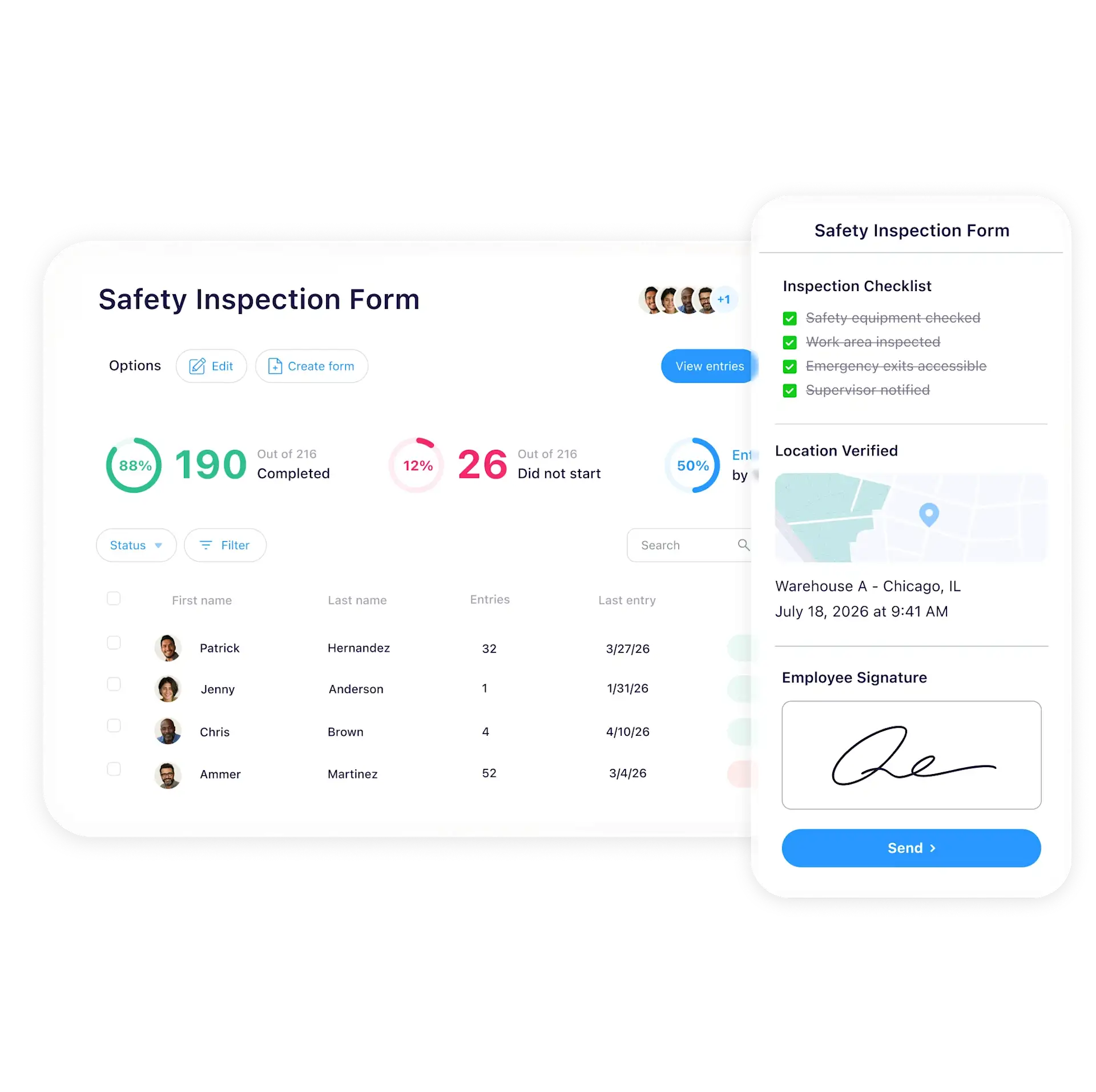
Connecteam shows a mobile safety checklist alongside form completion tracking. Source: Connecteam.
Connecteam may suit a small service company consolidating shifts, checklists and team updates in one employee app. The trade-off is that a general workforce platform should be tested against your audit process: can a failed answer create the follow-up you need, and can a supervisor review the whole record without a spreadsheet?
Pricing: Operations Basic is $29 per month annually or $35 monthly for the first 30 users. Conditional fields are listed under Advanced; API access and webhooks under Expert. Other hubs are priced separately. The free Small Business Plan supports up to 10 users, counting active and archived accounts, with one time clock and one job schedule. A more limited free plan supports up to 30 users.
6. GoCanvas: for field forms and document workflows
GoCanvas suits teams replacing paper forms that must become useful documents. Essentials includes offline mobile access, photo capture, dispatch, scheduling and configurable PDF reports. Pro adds multi-user workflows and API access.
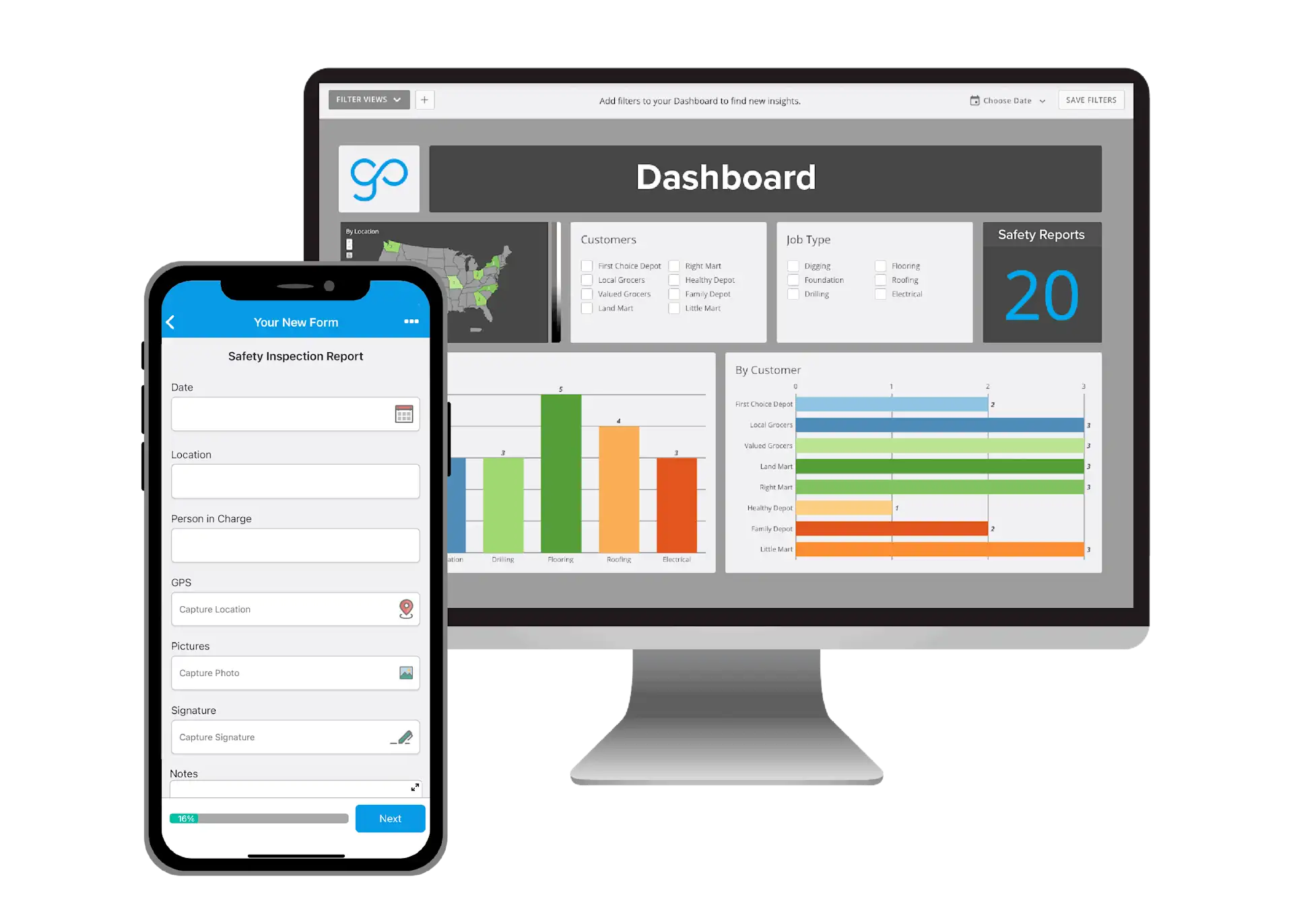
GoCanvas’s inspection example includes a mobile form and a reporting dashboard. Source: GoCanvas.
Think of an inspection that passes from a technician to a supervisor, with different people completing different sections. For a form-heavy Mitti process, compare how the record moves between people and systems. The quality of the final PDF, the hand-off between users and the connection to your office systems may matter more than a ready-made audit dashboard. If you also use Mitti for training or cross-site audit comparisons, ask the vendor to demonstrate those requirements separately; a form workflow alone is not a replacement for them.
Pricing: Essentials starts at $29 per user per month, Pro at $39 and Max at $49, billed annually with a three-user minimum. The minimum Essentials subscription therefore works out at $87 per month on an annual contract. Follow-Up Tasks are listed in Max; custom integrations and analytics are add-ons. Include those costs if they are part of your inspection process.
7. TrueContext: for technical fieldwork and controlled processes
TrueContext is a candidate when inspections involve detailed technical forms, changing asset information and connections to enterprise systems. Its Digital tier includes conditional logic, form version control, job dispatch and automated PDF, Word and Excel reports. Offline support is included.
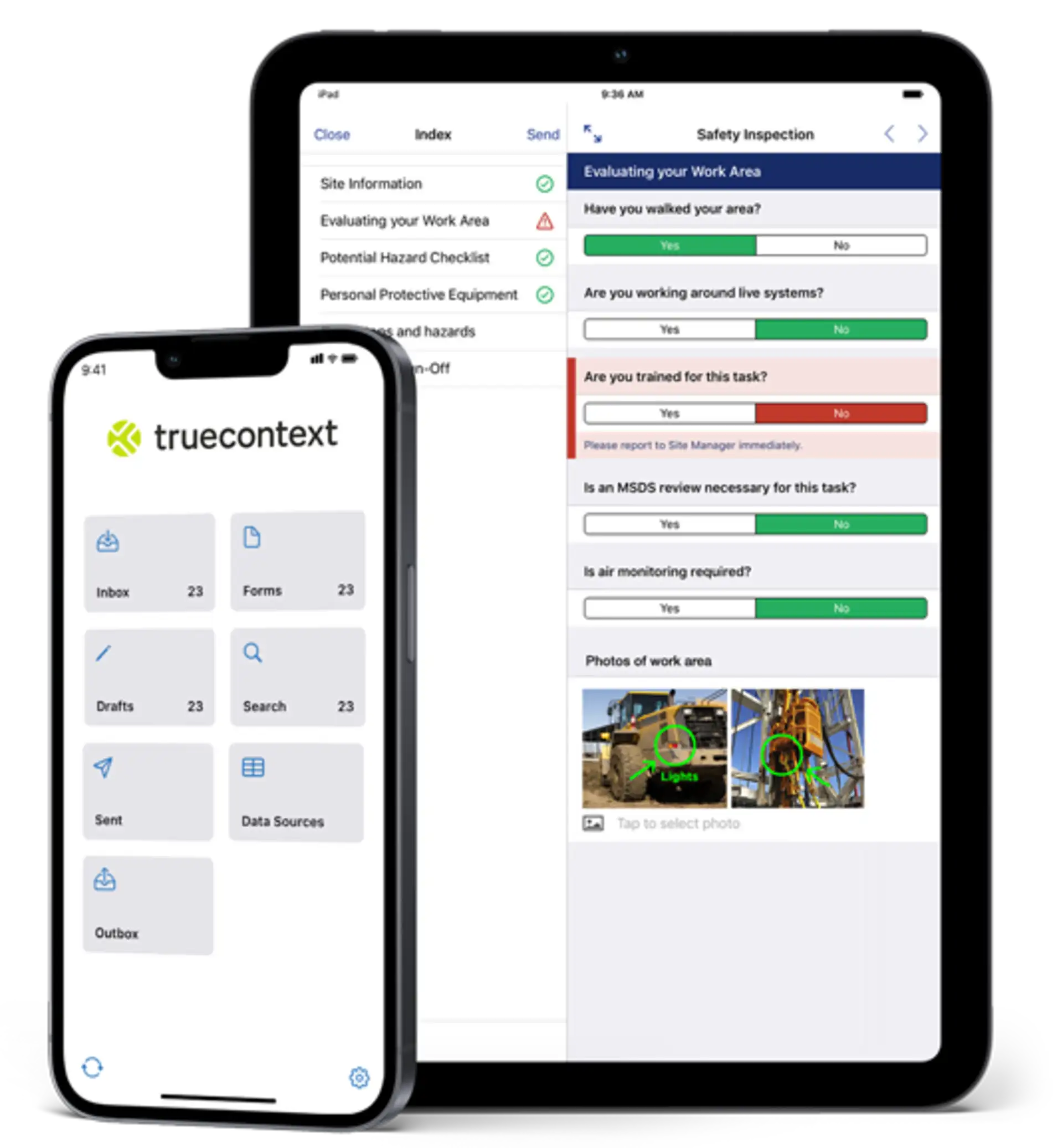
TrueContext’s safety inspection example includes on-screen guidance and annotated work-area photos. Source: TrueContext.
Evaluate TrueContext alongside Mitti when your technical field process needs configurable forms and connections to other systems. A technician may need different questions for each equipment model, reference material during the job and a record sent back to a service system. Build that example in the trial rather than judging the product by a generic checklist. Also ask who will maintain the forms and connections after launch, and which of your existing Mitti reports, training records and action workflows would need to be rebuilt or handled elsewhere.
Pricing: Digital starts at $400 per month for the team, billed annually. The pricing page does not specify the currency; confirm it with the vendor. Intelligent and Elite use custom pricing; capabilities such as the ServiceNow connector, SSO and extended histories appear in higher tiers. Confirm which users and workflows the quoted starting package covers. At the advertised $400 starting point, it may be difficult to justify for a small team needing only a few routine checks.
How to choose without buying more software than you need
Match the shortlist to your team
A small service business: start with the mobile workflow and total subscription cost. TARGPatrol is relevant for recurring site checks; Connecteam for forms alongside shifts and employee communication. Avoid paying for modules your team will not use. Ask a new starter to complete a real task without coaching.
A multi-site operation: choose according to the manager's daily job. TARGPatrol connects inspections to scheduled site work and checkpoint check-ins. GoAudits emphasizes scored audits and inspection reports. Lumiform is worth comparing when conditional inspection logic and corrective-action approvals are central. In each trial, add a location and check shared templates, access and reporting consistency, including any higher-plan requirements.
A maintenance department: prioritize the failed inspection becoming an actionable work order. MaintainX belongs on this shortlist when assets, parts and repair history matter more than a general safety program.
A technical field team: compare GoCanvas when dispatch, multi-user forms and customer-facing PDFs are the main requirements. Compare TrueContext when controlled form versions and connections to enterprise systems shape the workflow. Ask each vendor to demonstrate your actual data exchange on the quoted tier. More configuration can justify a steeper learning curve, but only if someone owns the administrative setup.
For scalability, repeat your pilot with the roles and site structure you expect next year. Confirm whether pricing grows by user, location, submission volume or module. A volume-based quote and a per-seat subscription can produce very different costs as the business grows.
Compare the same inspection from start to finish
Give each vendor the same test: schedule a recurring inspection, record a failed check with a photo while offline, assign a corrective action, have a supervisor verify the fix and export the complete record. Ask which plan supports every step and which steps need a separate system. Record missing features and manual work alongside the price.
Then change the template. Test the builder with your required field types, mandatory evidence and conditional questions. Check what happens to old submissions after an edit. An extensive template library is useful only if you can adapt the templates to the way your team works.
Check the mobile experience. Can a new employee find the right checklist and understand the instructions? In high-turnover teams, repeated training can cost more than a small subscription difference.
Test offline work properly. Download the work, turn off connectivity, add answers and photos, then reconnect. Check what was saved, what synchronized and whether the manager can distinguish unfinished work from a completed submission.
Follow a failed check through to closure. Assign an owner and deadline, add evidence of the fix and have someone review it. Confirm how overdue actions and rejected fixes are handled.
Inspect the record. Look for timestamps, author information, changes and attachments. Check whether audit trails are available on your plan and whether an edited checklist affects earlier records.
Try the integration. Identify the system that owns each record. Ask whether a connector can update existing records or only create new ones, how failures are retried and which API features cost extra.
Calculate the full cost. Count inspectors, managers, occasional users, locations, required modules, onboarding and data storage. Compare the same workflow on each quote.
Choose between ready-made workflows and configurability
For routine checks, a ready-to-use inspection and action workflow reduces initial system design. The trade-off is fitting your process into the product's structure. For unusual approvals or technical data collection, a configurable form builder may be a better fit, but someone must design the workflow, maintain the fields and test each change.
A small business without a system administrator should be cautious about deep configurability it cannot maintain. A larger team with complex safety requirements may accept formal onboarding and a steeper learning curve to gain the necessary control. Keep only the configuration that removes manual work for the team. Check what configuration includes: changing form fields is different from building approval processes, dashboards or entire modules. Ask the vendor to demonstrate the scope you need.
Agree who will deliver the rollout
Ask for an implementation plan with dates and named responsibilities. It should cover template conversion, user setup, data migration, integrations, training and the first live site. Separate the vendor's work from tasks your own team must complete.
A low subscription price can still require weeks of internal setup. Compare the staff time in each proposal, any paid implementation services and the support available during launch. Establish who resolves a failed import or integration and what happens if the planned start date slips.
Use acceptance criteria that you can demonstrate: a new employee completes a task without help, offline evidence synchronizes, a manager finds the unresolved finding, and the exported record contains the required evidence. Agree those tests before rollout so a delivered configuration is not mistaken for a working process.
Make the final choice with a pass-or-fail shortlist
First reject options that cannot meet a non-negotiable requirement, such as offline evidence capture or your required access controls. Do not let a low price compensate for a missing essential workflow.
For the remaining options, rate each part of the pilot as works as required, needs a practical workaround or needs custom development. Use the same categories: frontline usability, inspection and action workflows, reporting quality, integration effort, governance and total cost. Record who would perform each workaround and how often. Ten minutes of manual reconciliation every day is different from a one-time setup task.
Ask frontline workers to assess mobile usability, supervisors to assess action closure and reporting, and the administrator to assess configuration and integrations. Resolve disagreements by returning to the original requirements, rather than averaging away a serious problem for one role.
Choose according to business size and workflow complexity. A small team needs ease of use for frontline workers, reliable offline work and a pricing structure it can afford. A multi-site operation needs consistent inspection and action workflows, reporting quality and scalability without duplicating administration. Complex field operations may justify strong integrations, greater workflow customizability and a steeper learning curve. Compliance requirements remain a condition of the choice, whatever the company size. Compare the configuration your team can maintain, not the most elaborate demonstration a vendor can build.
Before signing, review renewal terms, price-change notice periods and data access after cancellation. Ask what happens if a required integration is discontinued. The ability to export a report during a trial does not establish what you can retrieve after the subscription ends.
Safety program visibility: inspections, training and follow-up
Reporting and analytics should help someone decide what to do next. Ask to see overdue corrective actions by location, repeat failures over a chosen period and the evidence behind a closed incident. Check whether managers can filter those views without asking an administrator to build a new report.
Report on safety activity and outcomes together. Use inspection schedules and training dashboards to identify missed checks and outstanding courses. Track repeat findings, Incidents and overdue actions separately to see where follow-up is still needed. A single completion percentage cannot answer both questions. A site with every checklist submitted may still have an unresolved serious finding.
A useful weekly review should connect a repeated hazard to the inspection evidence, the person responsible for the action and any relevant briefing or training record. For example, repeated blocked-access findings may warrant a review of task instructions and a toolbox talk, not just another ticked checklist. This is how the reporting workflow can support risk prevention rather than stop at collecting forms.
If a vendor demonstrates a real-time compliance score or AI copilot, check its inputs and calculation. Managers need to open the original evidence, see missing data and correct errors. Automated summaries should assist review, not stand in for the responsible person. Verify export access and reporting limits in the quoted plan.
Who will maintain the setup?
Ask a supervisor to change a form during the demo: add a measurement, make a photo mandatory after a failed answer and route the result for approval. Check which changes they can make themselves, which require an administrator and which require paid vendor help.
Conditional logic and specialized field types can make a form easier to complete, but they also need upkeep. Assign someone to manage template versions, permissions, dashboards and integrations. Ask what formal onboarding covers and whether later configuration changes cost extra. For example, an equipment inspection may need to read an asset record from another system, create a work order after a failed check and return the repair status to the inspection app. Ask the vendor to show this two-way integration, including authentication, field mapping and failed-transfer handling. A connector that only emails a PDF does not demonstrate that workflow.
Safety documentation: look beyond the completed checklist
An inspection report records what someone checked. It does not necessarily manage the procedure they followed, their qualifications or the approval to carry out the work. If those records are part of your safety and compliance program, include them in the comparison.
Check three kinds of records
Worker records: training completion, certifications, expiry dates, site orientations and worker sign-offs. Ask whether a manager can identify missing or expired records without opening every employee profile.
Site and contractor documents: safe work procedures, task instructions, contractor credentials and permits. Check how the applicable version reaches the worker and who can approve a replacement.
Inspection evidence: completed forms, photos, incident records, corrective actions and approval history. A reviewer should be able to trace the finding to the fix, even if the documents are held in connected systems.
Try a multi-person approval workflow
Consider a contractor preparing to work at a customer site. The coordinator checks credentials and required permits. The worker reviews the current task instructions and completes the site orientation. A supervisor reviews the inspection findings, assigns follow-up work and signs off when the required evidence is present.
Ask the vendor to demonstrate that sequence. Can each person see their own to-do list? What happens when a credential expires, an approval is rejected or the supervisor is absent? Is the rejected record preserved, and can the next reviewer see why it was returned? These questions separate a file upload from contractor management and controlled document workflows.
The record should distinguish preparation, submission, review and approval. If a reviewer returns it for correction, the worker needs the reason and a clear next step; a rejected submission should not look completed. A worker should not have to edit the supervisor's approval field just to finish their own section. Confirm whether hand-offs and reminders are built in or require a separate workflow tool.
Document control and document routing are different jobs
A safe work procedure is a reference document: workers need the approved version that applies to their job. A completed permit, inspection or acknowledgement is a work record: it captures what happened and may need several people's input before approval.
A document library can keep instructions available without moving a permit through review. A multi-person form can move through review without controlling the procedure it refers to. Successful routing does not by itself prove that everyone used the right instructions.
Choose according to the actual problem. When different sites use outdated procedures, prioritize document control and distribution of approved versions. When instructions are reliable but approvals get lost in email, prioritize routing, ownership and visible status. When both problems exist, verify both functions or keep the approved documents in an existing controlled system.
The final record needs a durable connection to its instructions. If a procedure changes later, a reviewer should still be able to understand which version applied to the completed work. That connection matters more than having every file in one app.
Match the document workflow to the product
For inspection results and corrective-action approvals, review Lumiform's package options. For a document completed by several people, GoCanvas lists multi-user workflows on Pro. For controlled technical forms, TrueContext lists form version control. These are different capabilities: moving a form between users does not necessarily provide contractor credential verification or policy management.
TARGPatrol is relevant when task instructions, inspection evidence and Incident follow-up need to stay connected to scheduled site work. Its paid audit logs add a history of supported changes, but that should not be confused with a complete document-control or training system. For every candidate, identify which records stay in the app and which remain in an HR, training or EHS system.
Keep training and toolbox talks in scope
Uploading training materials is not the same as tracking that people completed the training. If you need a dedicated toolbox talk module, ask to see attendance, worker sign-offs and the exact version of the material presented. For QR-based sign-off, check how the attendee is identified and how a supervisor corrects a missed or duplicate entry.
For high-turnover teams, a useful orientation workflow records what a new starter received, what they acknowledged and what remains outstanding. Certification tracking adds expiry dates and reminders so a manager can arrange renewal before the record lapses. A training dashboard should distinguish invited, started, completed and overdue work rather than count uploaded files. Confirm whether contractor records are included and whether course content costs extra. An inspection subscription should not be assumed to include a learning-management system.
If your team uses Mitti's training features, include them in the replacement brief. Connecteam offers a separate HR & Skills hub; its Operations price alone does not represent the whole employee-training setup. With an inspection-first tool, you may instead keep a separate training platform and link the relevant instructions to the work. Compare the administrative effort of maintaining both systems.
For toolbox talks, the useful output is a record of the subject, material version, attendees and outstanding follow-up. For hazard assessments, it is the documented finding, the required action and evidence that someone reviewed the response. A centralized dashboard becomes useful when it connects those records to a location and responsible manager. Otherwise, the team may still be chasing attendance lists and corrective actions by email.
Enterprise safety and governance: decide what the system must own
A digital inspection app and an environmental, health and safety (EHS) management system are not interchangeable. Site teams need to record checks and resolve findings. An enterprise safety team may also own policy management, contractor management, training compliance, risk assessments and regulatory reporting. Decide which of those responsibilities the replacement must support before choosing a product.
For example, an ergonomics assessment can produce a finding and a corrective action. Managing the broader program also means maintaining the assessment method, approving changes and comparing results across sites. Likewise, a completed safety form is evidence, not a service that keeps track of changing regulatory obligations. Multi-jurisdiction reporting needs its own review by the people responsible for those obligations.
Separate local work from central control
A site manager may need to assign a local corrective action without changing the inspection standard for every site. A central safety lead may need organization-wide visibility while workers see only their assigned locations. Role-based permissions should reflect that division of responsibility. Shared access is not a substitute for knowing who can approve, edit or remove a record.
Test access with ordinary accounts, not only the administrator used in the demo. Can a contractor open another site's records, export attachments or change an approved result? Remove a test user and verify that access ends on both mobile and web. If you require single sign-on or automated user provisioning, confirm the plan and the behavior of existing sessions when someone leaves. Login controls and permissions to change safety records are separate requirements.
Document control protects the context of earlier work. An inspection completed under version one of a procedure should remain understandable after version two is introduced. Look for the author, timestamp, changes and approval history you need to explain the record later. Set retention requirements before comparing subscription limits, including how long attachments remain available.
Compare controls, not just an Enterprise plan name
The shortlist offers different starting points. TARGPatrol includes audit logs on paid plans. Lumiform makes approvals and enterprise integrations package-dependent. TrueContext lists form version control, with SSO and extended histories in higher tiers. These controls solve different problems; none alone establishes complete enterprise safety coverage.
A larger organization may keep its specialist EHS system and use a field app for inspections and incident reporting. That arrangement needs clear ownership: which system holds the approved procedure, which assigns corrective actions, and which retains the final record? Confirm how records move between them and who handles failed transfers.
Have the responsible internal team review data location, retention and access requirements. Identify any required regions for live records and backups, and ask where support staff can access them. Regional availability does not by itself establish data residency. Get the relevant commitments in writing. Include exports, onboarding, support commitments and the required controls in the quote, rather than relying on a generic feature list.
Plan the move before cancelling Mitti
Pilot the replacement at one or two sites before cancelling. Rebuild your most-used templates and have the people receiving the reports sign off on the result. Keep the existing process available until ongoing inspections and follow-up actions are working reliably in the replacement.
Inventory your historical inspections, media, open actions and integrations. Agree what will migrate and what will remain in an accessible archive. Before cancelling, verify that you can retrieve the records your business needs and that responsibilities for unfinished actions have been transferred.
Set a cutover date for new work. If an inspection or corrective action changes in Mitti after the first export, assign someone to reconcile it before the move. Keep one active owner for each unfinished action so parallel systems do not produce conflicting updates.
Frequently asked questions
Can I move my SafetyCulture templates to another app?
Do not assume an automatic import. Give the vendor one template with scoring, conditional questions and required photos. Check what transfers and what needs rebuilding. Template definitions and completed inspection records are separate migration tasks.
Which SafetyCulture alternative is free?
TARGPatrol and MaintainX offer ongoing free plans. Connecteam also has free options with eligibility and feature limits. A free plan remains available within its limits; a trial is temporary and may expose features that disappear afterward. Compare the ongoing plan against your routine work, especially media retention, attached procedures and exports. Our free digital checklist apps comparison covers that narrower question.
Does offline access mean every feature works offline?
No. Ask which forms and reference files must be downloaded first, whether photos remain queued on the device, and what happens if two people edit related records before syncing. Verify the exact workflow on the phones your team uses.
Start with a real inspection
Need to connect inspections with everyday work? Explore TARGPatrol for site inspections and try one of your existing cleaning, security, retail or facilities checklists with your team.