TARGPatrol
Checklists LibraryStore Guard Checklist
Security Guard Services
3/26/2026

Store Guard Checklist

Store Guard Checklist is a patrol control checklist designed for security staff working in retail environments. It helps structure routine rounds inside the store and around adjacent areas, so the guard is not simply “walking the site,” but consistently checking the points that matter most: entrances, sales floor, checkout zones, stockrooms, service doors, emergency exits, perimeter access, and visible security equipment. The checklist is used to detect theft risks, access issues, suspicious behavior, safety hazards, and operational irregularities during the patrol itself.


In TARGPatrol, the guard completes the checklist directly from a mobile device while moving through the route. During the round, the officer can confirm completed checkpoints, note unusual situations, add comments, attach photos, and document the action taken immediately on site. This creates a clear digital trail of the patrol, makes supervisor review much easier, and helps distinguish between a completed patrol and a properly executed one.

Store Guard Checklist
97/97

Security officer reported for duty as scheduled

Uniform meets store security requirements

Required protective gear is available before patrol

Protective gear is suitable and in usable condition

Radio or other communication device works properly

Patrol smartphone / handheld device is charged and ready

Flashlight is available for patrol use

Issued keys, badges, or access credentials are available

Extra patrol equipment is available if required by site rules

Any problem with issued gear or readiness noted before start

Photo of issued equipment if needed

Patrol round began according to schedule

Officer is following the assigned route

All required control points are included in this round

Checkpoint verification method is functioning correctly

Special instructions for the shift were reviewed before patrol

Any issue identified before entering patrol route

Customer entrance is secure and operating normally

Entry zone is calm and properly controlled

No unauthorized person is lingering near the entrance

No visible damage to entrance doors, locks, or glazing

Suspicious behavior near the entrance was observed

Comment on front entrance condition

Photo of front entrance issue

Sales area is under normal control

Shopping aisles remain clear for customers and staff

Promotional displays and shelving appear stable

High-theft or high-value product zones are being monitored

No obvious tampering with merchandise is visible

Customer activity appears normal for the time of patrol

Suspicious customer activity detected on the shop floor

Comment on sales floor status

Photo of sales floor issue

Checkout area is operating under proper control

Cash desk zone is protected from unauthorized access

POS devices and related equipment appear intact

Cash handling area shows no visible irregularity

No unusual behavior observed around tills or registers

Comment on checkout / cash desk area

Photo of checkout area issue

Fitting room area is monitored where applicable

No suspicious movement or concealment behavior observed near fitting rooms

Doors, locks, and fixtures in fitting room area appear intact

Assistance or emergency call point works where applicable

Comment on fitting room condition

Photo of fitting room area issue

Back-room and staff-only zones remain secured

Stockroom access is controlled properly

Inventory storage appears orderly and protected

Receiving / delivery point is monitored or restricted as required

No unauthorized person is present in non-public areas

Comment on stock / back-room condition

Photo of stockroom or restricted-area issue

Emergency exit doors are available for immediate use

Escape routes are free from blockage

Fire extinguishers are in place and reachable

Alarm call points / detectors are not obstructed

First aid supplies are available where required

Comment on emergency readiness

Photo of fire or emergency issue

Service entrance or loading point is controlled where applicable

Delivery doors remain secured when not in active use

Goods movement area is protected from unauthorized access

No unusual product removal or transfer activity observed

Comment on loading / service area

Photo of loading or delivery issue

External doors and perimeter access points are secured

Parking or exterior approach area appears normal

Outdoor lighting is functional where required

No suspicious vehicle or person is present near the store exterior

Comment on outside / perimeter condition

Photo of exterior area issue

Visible cameras show no obvious damage

Alarm panel or security panel shows no visible fault

Anti-theft gates / EAS equipment appear operational where installed

Access control hardware works properly where applicable

Comment on security systems condition

Photo of security equipment issue

Possible theft indicator was noticed during patrol

Aggressive, disruptive, or confrontational behavior was observed

Slip, trip, or fall risk was identified

Leak, spill, or technical maintenance defect was identified

Damage to doors, locks, glazing, shelving, or fixtures was identified

Unattended item or suspicious package was identified

Employee conduct issue or policy breach was identified

Details of incident, irregularity, or hazard

Immediate steps taken by the officer

Photo of incident / irregularity / hazard

Every assigned checkpoint was completed during the round

Relevant findings were escalated to manager or supervisor

Further action is required after this patrol

Repeat issue from earlier patrols was identified

Patrol summary

Highest-priority issue found during patrol

Additional notes

Overall status of the patrol round

Supervisor / manager name and signature

Similar checklists
Security Guard Patrolling Checklist
Security Guard Services
8/20/2025

Security Guard Patrolling Checklist

A Security Guard Patrolling Checklist turns a long shift into a series of quick, verifiable actions. Instead of walking the grounds from memory, an officer moves through a list that starts with a gear check and ends with the last padlock at the gate. In between come timed perimeter passes, interior sweeps, visitor-badge counts, alarm-panel checks, and system tests. Each line spells out the success criterion — “gate set to night-lock,” “server room door locked,” “panic button test recorded” — so there’s no debate about what finished means. For building owners and contract-security firms, the document builds a solid record. Paper versions carry signatures and time stamps; digital templates in guard-management software add QR codes, GPS pings, and photo uploads. A picture of a damaged hinge or a blocked exit lands in the maintenance queue before it becomes a safety breach, and a map view shows management that every checkpoint was hit on schedule. Guards like the predictability. A pre-shift section confirms radio batteries and reviews the last incident log; mid-shift loops break large properties into smaller runs so no stairwell or loading dock is skipped. The checklist also backs up shift exchanges: key returns, and logbook notes are right there, preventing loose ends when the next officer clocks in. Because sites change, the list is meant to evolve. New camera zones, seasonal lighting, or temporary construction areas can be added in minutes — no need to rewrite the entire manual. Update once a quarter and the patrol routine stays lean, compliant, and matched to today’s risks.

Night Patrolling Security Checklist for Guards
Security Guard Services
8/20/2025

Night Patrolling Security Checklist for Guards

A Night Patrolling Security Checklist is a guard’s road map through the riskiest hours of the day. Instead of walking the site from memory, the officer follows a timed sequence: gear checks, first perimeter sweep, interior rounds, high-risk area inspections, random QR/NFC scans, and a final lock-down before hand-off. Every line spells out a clear result, so there’s no debate about what “done” means when supervisors review the log. Because the tasks are arranged in the same order most insurers and clients expect, guards can complete a full tour without doubling back or missing blind spots. The printed PDF version clips easily to a clipboard for low-tech facilities, while the app template adds GPS pings, photo uploads, and instant incident tickets. That real-time data lets supervisors verify that rooftop doors, loading docks, and server rooms were checked on schedule — no need for late-night calls or second shifts. For security firms, the checklist standardises labour hours and reduces callbacks. QR scans and GPS stamps prove patrols happened, which is invaluable when a client questions billing or an insurer asks for documentation after a break-in. Property managers benefit too: maintenance issues such as broken lights or leaking pipes are flagged during patrols, often before tenants notice. Best of all, the document is easy to update. Add a new camera zone, change an access schedule, or remove a temporary construction area in minutes — then print fresh copies or push the update to the app. The result is a patrol routine that stays tight, auditable, and perfectly aligned with each night’s evolving risks.

Coast Guard Boat Safety Checklist
Security Guard Services
8/20/2025

Coast Guard Boat Safety Checklist

A Coast Guard Boat Safety Checklist is a captain’s shortcut to a hassle-free inspection and, more importantly, a safe voyage. Instead of hoping that registration papers are current or that every life jacket is serviceable, the checklist walks crew through a fixed sequence — documents, flotation gear, distress signals, fire equipment, navigation lights, mechanical checks, pollution controls, deck integrity, and a final crew briefing. Because the list is organised in the same order inspectors use, completing it before every departure saves time at the dock and reduces the risk of fines, voyage delays, or failed safety drills. Captains can clip the free PDF to a bulkhead for quick pen-and-tick use, then file the sheet in the logbook as proof of compliance. Larger fleets often load the template into a mobile safety-management app, where crews time-stamp each step, attach photos of HIN plates or extinguisher gauges, and sync the report to shore staff for real-time oversight. The checklist also standardises maintenance routines. Weekly run-throughs reveal cracked fuel lines or dead navigation bulbs before they become mid-channel breakdowns. Quarterly archive files give owners a clear service history — useful for insurers, surveyors, and resale negotiations. If the vessel’s gear list changes (for instance, switching to inflatable PFDs or adding AIS), updating the template takes minutes, keeping the routine aligned with the latest Coast Guard regulations. Whether you skipper a weekend runabout or manage a charter fleet, a Coast Guard Boat Safety Checklist turns scattered “don’t forget” notes into one reliable routine — protecting passengers, meeting legal requirements, and letting everyone focus on enjoying the water instead of worrying about paperwork.

Checklist for Security Guard
Security Guard Services
8/20/2025

Checklist for Security Guard

A Security Guard Checklist is a practical script that guides officers through an entire shift, from the moment they clock in to the last perimeter sweep. Instead of relying on memory or scattered notes, guards follow a clear series of tasks — gear inspection, perimeter walk, interior patrol, system checks, incident reporting, and end-of-shift hand-off — each with a simple “done” standard. That structure keeps coverage consistent and lets supervisors verify that every entry door, camera feed, and alarm panel was actually checked. For guards, the checklist removes uncertainty. Pre-shift questions — “Is my radio charged? Did I review last night’s incident log?” — are right at the top, so they start the round fully prepared. During patrols, the document breaks large areas into smaller checkpoints (fence line, stairwells, server room), reducing the chance of skipping a blind spot. Space for quick notes and license plates means critical details are captured while they’re fresh, not scribbled hours later. Property managers and contract-security firms gain an audit trail. A signed paper sheet or time-stamped mobile entry proves that required patrols happened on schedule and that keys, badges, and visitor logs are accounted for — important when insurance claims or compliance audits arise. Optional photo uploads (e.g., a damaged gate or blocked fire exit) let managers act on maintenance issues before they balloon into liability. The checklist is available as a printable PDF — ideal for low-tech sites — or as a digital template in a security app, where tasks trigger reminders and incident forms auto-populate. Whichever format you choose, treat it as a living document: update it when new cameras go live, when entry schedules change, or when a client adds EV-charging bays to the parking lot. A few quick edits keep your security routine tight, verifiable, and ready for any shift.

Mobile Work Order Management Software for Business Maintenance
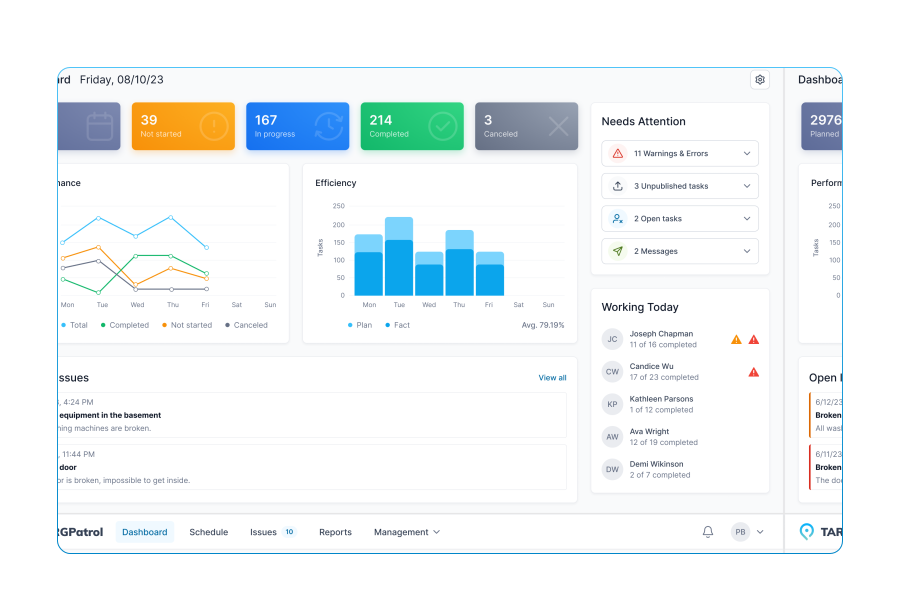
A cloud-based work order software designed to streamline inspections and task management across diverse service areas, enhancing operational efficiency and productivity.
Try now for FREE
TARGPatrol promo